
How to Start Selling Valentine's Day Gifts Early: A Jewelry Store Strategy
We know Valentine's Day doesn't begin on February 14th. It begins the moment your customers start thinking about who they love and what they want to give them.
The jewelry retailers who see success for Valentine's Day aren't necessarily the ones with the biggest inventory or the deepest discounts. They're the ones who start outreach early, personalize the experience, and make it effortless to buy.
Here's how to build an early-selling Valentine's strategy using tools you already have: Collections, Mass Messaging, Reminders, Appointments, and Payment Links.
Why Early Selling Works for Jewelry Stores
Valentine's Day shoppers fall into three categories:
Planners want it handled early, beautifully, and efficiently. Browsers aren't sure yet but are open to your guidance. Last-minute shoppers need fast options with zero friction.
Early selling helps you win all three. Planners buy sooner. Browsers convert with reminders and curated options. Last-minute shoppers purchase from ready-to-go gift guides.
The key is to treat Valentine's like a clienteling opportunity, not just a promotion.
5 Tools That Turn Early Outreach into Revenue
1. Collections: Your Personalized Curation Tools
Instead of sending random photos or "come in and look," use Collections and Wishlists to create personalized, curated shopping experiences for each customer.
When a customer responds to your outreach or books an appointment, quickly build a Collection or Wishlist from their profile with 3-5 pieces tailored to their budget, style, or needs. Keep it personalized and tailored to just a few pieces, because customers can freeze when overwhelmed.
Collections are perfect for presenting options during active conversations. Wishlists are ideal for saving favorites they want to think about or get approval on from a partner. Both keep momentum alive.
Use gift guide structures (see below) as your mental framework for what to pull, but remember: every Collection and Wishlist is built specifically for that individual customer from their profile.
2. Mass Messaging: Your Conversation Starter
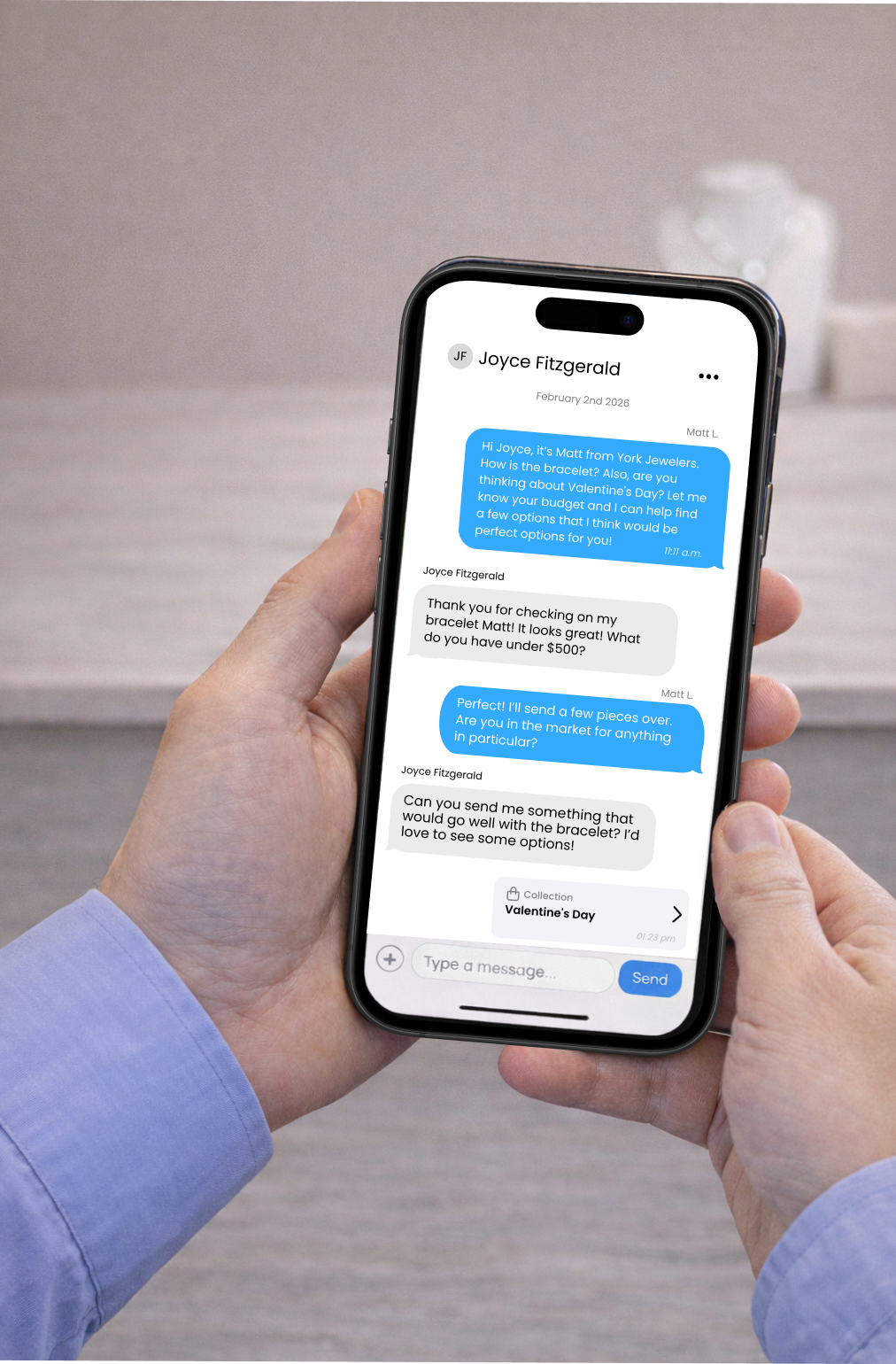
Valentine's campaigns work best when they feel personal, even at scale. Use Mass Messaging to start conversations: ask about budgets and preferences, offer to curate personalized options, drive booked appointments, or deliver VIP early access.
Keep messages short. The goal is to start a conversation and to keep it feeling personal.
3. Reminders: Your Follow-Up Safety Net
Set up reminders to remember to re-engage customers who browsed during the holidays but didn't buy. These reminders ensure that no guest or potential purchase slips through the cracks, keeping you top-of-mind without requiring too many mental checklists from your team.
Valentine's Day is the perfect excuse to re-engage those holiday browsers: "I know the holidays were busy but Valentine's Day is coming up. Want me to pull a few gift ideas for you?"
4. Appointments: Convert Browsers and Raise Average Ticket
Valentine's shoppers do better with guidance (especially men buying jewelry). Appointments help you control the experience, show curated pieces, create urgency without pressure, and increase close rates along with average spend.
Consider offering both a "Quick Gift Appointment" and a "Valentine's Styling Appointment" to help create a painless gifting experience.
5. Payment Links: Close Sales Without Waiting
This is your secret weapon for early selling. Use payment links to close the sale while the customer is excited, use them to sell remotely, or to secure a piece before it's gone. Valentine's shoppers don't want a complicated process. They want: “yes, that one!” and done.
3 Gift Guide Structures You Can Use as Frameworks
Use these structures to organize your inventory (and thinking), so when customers respond with their budget or preferences, you can quickly pull the right pieces and build a personalized Collection right from their profile.
Gift Guide #1: By Budget
This type of gifting is super popular and easy - perfect for text conversations and setting appointments.
- Under $250: studs, small pendants, stackable bands
- $250–$500: solitaire pendants, gold chains, birthstone pieces
- $500–$1,000: diamond hoops, starter tennis bracelets, halo pendants
- $1,000+: signature pieces, anniversary-worthy gifts, upgrades
When customers tell you their budget in your Mass Message response, review their purchase history and pull 3-5 pieces that match their style from that tier and build their collection.
Gift Guide #2: By Relationship Stage
This is great for clienteling because it feels like personal styling.
- New Relationship: sweet, thoughtful, not "too much"
- Long-Term Partner: elevated classics
- Spouse or Life Partner: meaningful, higher-ticket, timeless
- Self-Love: gifts they buy themselves
During conversations, ask "How long have you two been together?" then curate pieces from the relevant category into their Collection.
Gift Guide #3: By Style Type
Style type selling is great for women buying gifts - for their spouse, or themselves! Structure it like a personal shopping quiz.
- The Classic: studs, solitaire, tennis bracelets
- The Trendsetter: mixed metals, chunky gold, ear stacks
- The Romantic: hearts, halos, rose gold
- The Minimalist: thin bands, petite pendants, bezel settings
Mass message a quiz-style question: "Is your jewelry style Classic, Trendy, Romantic, or Minimal?" Then build their collection based on their answer.
5 Valentine's Day Text Message Templates
Here are 5 easy ways to start the conversation with your potential Valentine’s shoppers.
1. "Hi [Client Name]! 💘 Valentine's Day is coming up fast. Want me to pull a few gift ideas based on your budget?”
2. "Hey [Client Name], thinking about Valentine's Day? Let me know your budget and I'll send a few options that would be perfect for you."
3. "Hi [Client Name] 💝 We're offering quick 15-min Valentine's gift appointments next week. Want me to reserve you a spot?"
4. "Hey [Client Name]! I saved a few pieces for you in your wishlist, want me to text them over so you can choose your favorites?"
5. Payment link close: "Perfect choice 😍 Want me to send a secure payment link so we can wrap it and have it ready for pickup (or ship it) as soon as possible?"
The 2-Week Valentine's Timeline
Week 1: Start Conversations (14–8 Days Out)
Day 1: Prep
Start by familiarizing yourself with some gift guides (budget, style, relationship stage), set appointment types (15-minute and 30-minute), and create quick reply templates.
Day 2: VIP and High-Spend Outreach
Mass message top clients. Offer early access and personal curation and be ready to build quick Collections for interested customers
Day 5: Appointment Push
Invite customers to quick gift appointments. Focus on "easy and fast."
Week 2: Convert and Confirm (7–1 Days Out)
Day 8–9: Wishlist Follow-Up
Text saved favorites. Reduce options to top three picks.
Day 10: Scarcity Message
"Best-sellers are going fast." Push to pay and reserve.
Day 13: Final Remote Closes
Payment links and shipping or pickup confirmations. "We can gift wrap and have it ready."
Make Valentine's Easy, and They'll Buy More
Valentine's shoppers don't want to browse forever. They want the feeling of: "Wow, that was easy… and that looks amazing."
With collections for personalized curation, mass messaging for reach, wishlists for momentum, appointments for a great experience, and payment links for frictionless close, you can turn February into one of your strongest sales months of the year.
The key? Ask the budget question early, then build quick, personalized collections from each customer's profile. Personal curation beats generic gift guides every time.