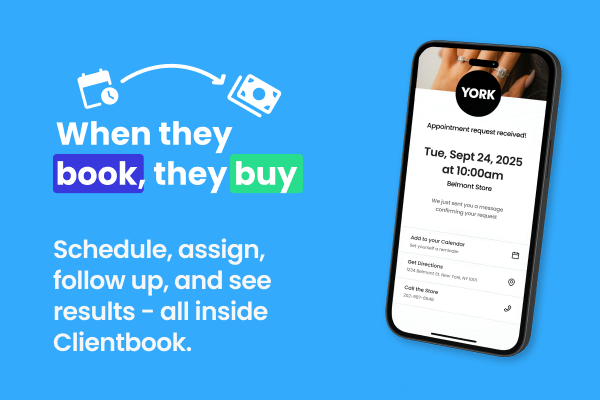

Walk-in traffic isn't what it used to be, and the stores that succeed today aren't waiting for customers to show up. They're bringing customers back on purpose. The single most effective way to do this? Setting appointments. An appointment transforms a casual browser into a committed buyer, turning a "maybe later" into a definite sale.
That's exactly why we're launching Clientbook Appointments.
The Hidden Problem: Appointments That Vanish
On paper, you "offer appointments."
In real life, here's what we see actually happen: a potential client fills out the form on Friday night. It hits a generic email inbox. By the time someone sees it, forwards it to the right person, and they actually reach out, that guest has already booked with whichever store replied first.
Nobody's being lazy, but your system is.
Appointment inquiries are living in inboxes, not in Clientbook. There's no clear owner, no easy way to prepare for the visit, and no way to see which appointments actually turned into sales. You're doing the hard part (getting people to raise their hand) and then leaving the outcome up to luck.
This isn't just frustrating. It's expensive. Every missed appointment request is a high-intent shopper who walked into a competitor's store instead of yours.
How Jewelry Store Appointments Drive Revenue
Clientbook Appointments puts those high-intent moments where they belong: inside your clienteling system.
Everything Lives in One Place
When a guest books from your website, a QR code, or a link that you text, that request flows straight into Clientbook and ties immediately to their client profile. No more Calendly data living separate from client data. No more toggling between three different tabs trying to piece together who's coming in and what they want.
One system. One flow: Booking → Conversation → Sale.
It shows up on your associate's Today page right next to their reminders, not buried in someone's email. Because the appointment is anchored to the client profile, your system automatically becomes smarter and your team becomes more prepared.
Your Team Is Ready Before the Customer Walks In
Now, before the guest ever walks in, your associate can see their full history: past purchases, preferences, notes from previous visits. Instead of starting with "So, what brings you in?" they're saying:
"Last time you were here you loved that oval halo in yellow gold. I already pulled a few similar pieces I think you'll really like."
Same 30-minute appointment. Very different odds of a sale.
This level of preparation signals respect for the client's time and elevates the perceived value of your service. It transforms a generic sales pitch into a curated, personalized consultation. You're not scrambling to remember who they are: you're demonstrating that you already know.
Reminders Happen Automatically
The reminders and confirmations? Those stop being a memory test.
Once an appointment is booked, the system takes over the logistics. It sends automated confirmation SMS reminders at intervals you define. These aren't generic robot texts because they come through the same familiar number your clients are used to communicating with.
If a client needs to reschedule, they can do so easily without playing phone tag with your front desk. Messages go out automatically at the right times. Guests show up because the system remembered for you, even when your floor was crazy and your team forgot to send that text.
This automated follow-up reduces no-shows dramatically and frees your associates from administrative tasks so they can focus on what they do best: selling.
Centralized Team View
Manage your entire team's schedule from one unified view. See who's available, schedule appointments for any associate, and maintain a clear overview of your store's daily, weekly, and monthly commitments. This eliminates confusion and double-bookings that can damage customer trust and waste your team's time.
Measure Success in Dollars, Not Just Dates
If you're using a generic scheduling tool, your analytics probably stop at "number of bookings." You might know that you had 50 appointments last month, but do you know what those appointments were actually worth?
Jewelry stores need better metrics. Because Clientbook Appointments integrates with your sales tracking, you can finally see the full picture: how many appointments you had, how many showed, how many of those guests ended up buying, and what they spent.
You're not guessing which appointments led to more revenue. You can see it.
Track Attributed Revenue
Clientbook connects directly with your sales data. When a client makes a purchase during their appointment window, the sale is automatically attributed to that appointment. You gain crystal-clear visibility into the ROI of your appointment management efforts.
This data allows you to answer the hard questions:
- Which appointment types (e.g., "Custom Design Consultations" vs. "Repair Pickups") have the highest close rate? Knowing this data will help provide insights that let you prioritize higher-value appointment types in your marketing.
- Which associates are best at converting appointments into sales? Now, you can see that Jennifer closes 80% of her booked appointments while Tom closes 40%, giving you concrete coaching opportunities.
- What's the average transaction value of a booked appointment versus a walk-in? When you see that appointments convert 2-3x better than walk-ins, you'll prioritize filling your calendar over hoping for foot traffic.
This level of insight transforms your retail scheduling software from an administrative tool into a strategic revenue driver.
Why Generic Scheduling Tools Fail Retailers
You might be thinking, "I already use Calendly" or "we have Podium for scheduling." While those platforms work for general purposes, they're not built for the specific needs of luxury retail and jewelry store appointments.
Here's the fundamental problem: Generic tools create data silos.
Calendly doesn't know her ring size or the date of her anniversary. Podium can't link an appointment to a $10,000 sale in your POS system. These disconnected tools mean your team has to manually enter customer data, track sales separately, and hope the information lines up.
A notebook with 400 entries labeled "guy - gold chain maybe?" isn't a strategy. When you're managing high-ticket purchases and relationship-driven sales, you need appointment management for retailers that understands the context of luxury retail.
Clientbook Appointments leverages the client data already in your system to make every interaction personal and effective. It's CRM scheduling integration done right: built by retail experts, for retail experts.
Robbins Brothers has been an early adopter of appointments and uses the reporting visibility to better understand appointment outcomes and streamline their in-store workflow.
Proof This Isn't Just Software Talk
We know this from the data: appointments convert 2-3x better than walk-ins. Existing guests already spend more and say yes more often. When you give those guests dedicated time, a prepared associate, and a quick confirmation on their phone, you're stacking the deck heavily in your favor.
The people willing to book time with a jeweler? Those are your proposal shoppers, anniversary planners, and "finally upgrading the diamond" buyers. They're going to spend real money with someone. The only question is whether your system treats their request like a priority or a suggestion.
Why You Don't Want to Wait
Every week you keep running appointments through forms and inboxes, you're taking your best buyers and rolling the dice.
This launch is about getting intentional:
- Every appointment lives in Clientbook, not in an email inbox
- Every associate walks into appointments prepared
- Every owner can see what those appointments are actually worth
No extra spreadsheets. No new "project." Just putting structure around a part of your business that already exists and already matters.
Getting Started with Clientbook Appointments
Ready to transform how you handle jewelry store appointments? Here's how to get started:
- Talk with our team about turning on Appointments for your store. If you're already on Clientbook, this integrates seamlessly with your existing workflow.
- Set up your booking preferences by deciding which stores accept appointments, which appointment types to offer, setting your team's availability, and customizing your automated messaging.
- Start booking and share your appointment link via text, email, QR codes in-store, or embed it on your website. Watch as requests flow directly into your CRM instead of getting lost in email.
Your Move
If you're already on Clientbook, talk with our team about turning on Appointments and building it into your daily rhythm.
See Clientbook Appointments in action and decide if it fits your store.
Book a demo by clicking the button above, or at demo.clientbook.com