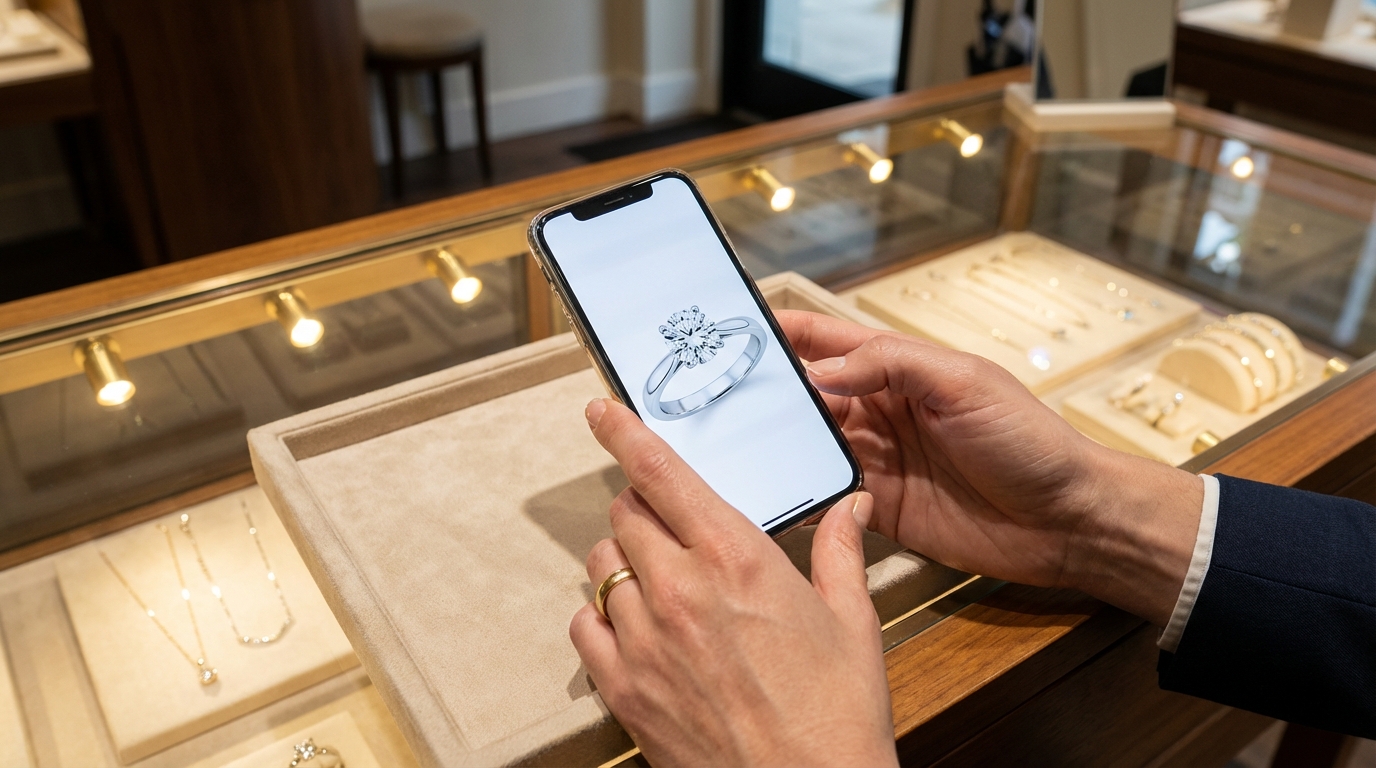

Jewelry is a visual business. Customers need to see the sparkle, the setting, the way a stone catches light before they decide. And increasingly, they want to see it on their phones before they ever walk into your store.
The stores winning that moment are the ones whose associates can text a high-quality product image, from a real brand catalog, in seconds. Not a screenshot. Not a fuzzy photo. A professional image that makes the customer want to come in.
Here is what actually works, and what to look for before you commit to a platform.
What Jewelry Stores Need From a Visual Selling Tool
Most general SMS platforms support image messaging. That is not the problem. The problem is where the images come from and what happens after you send them.
High-resolution brand catalog access. Your associates should be able to browse real designer catalogs, find the right piece by name or product ID, and send it without downloading files or hunting through shared folders.
POS integration. If the platform does not sync with your existing POS, purchase history and client preferences are not connected to the outreach. You are sending images without context.
Personalization at the associate level. Mass image blasts do not close jewelry sales. One associate texting one client a specific piece tied to her wishlist does.
Automation tied to purchase history. The best platforms surface which products to share and when, based on what a customer has already bought or browsed.
How to Send Customers High-Quality Product Photos From Your Brand Partners
If you want to send customers high-quality product photos from your brand partners, the practical answer for a jewelry store is to stop sourcing individual image files and start sourcing catalogs. In Clientbook, an enrolled brand catalog is loaded into the platform itself, so the associate texts the brand's own catalog image straight from the product page instead of pulling a file off a retailer asset portal or photographing the piece through the case glass.
Where the images come from. Once a brand catalog is enabled on your account, your team has access to that brand's inventory along with its high-quality images. Associates find a piece by searching the product name or the product ID in the Products tab, on the dashboard or in the mobile app. Any vendor catalogs you have enabled appear in the left-hand column, directly below your own inventory options.
How an associate finds one and sends it. Open the product, then use the message icon in the top right corner of the product page. Search for and select the client, then hit send. From that same product page an associate can also add the piece to the client's wishlist or collection, or open the full details like SKU and product type. One thing to know before you train the floor on it: the share option only appears for products that have images attached.
Why the quality holds up. The image the associate sends is the brand catalog image stored in Clientbook, not a phone photo taken through the case. The associate is not downloading a file, renaming it, or hunting a shared drive for last season's folder. What the customer's carrier does with the file after it leaves Clientbook is the carrier's own policy, which is why the size limits below matter. That matters more in jewelry than in almost any other category, because the decision is being made on a screen before the customer ever sees the piece in person. Here is why high-quality product images matter even for in-store retailers.
What the customer sees. A text from your store, from the associate she has worked with, with the piece in it. No login, no download, no gallery link to open on a laptop later. Wilson Diamonds' published results are a 98 percent read rate on messages and a response rate over 71 percent, from a process that includes texting professional images of items a client was interested in. That is the argument for putting the image in the text the client already reads.
The Questions Associates Ask Before They Start Sending
Which brands can we get? Clientbook's Vendor Integration documentation names Tacori and A.JAFFE as catalogs stores can opt into. The current list, and enrollment itself, runs through your Client Success Manager or the Clientbook team rather than a self-serve setting, so that is a question for onboarding. Enrolling is free, and the feature is only available if your account includes a point of sale integration. See the full list of supported jewelry store POS systems.
Can we send more than one piece at a time? One share from the product page goes to one client, as one message. To send several catalog pieces, send them as separate messages, or add them to a collection. A collection arrives as a link the customer opens. That is a different experience from a single image in the thread, and it is the one case where a link is the product.
If your team is attaching image files directly, to an individual message or a template, supported types are PNG, JPG, and GIF. The total of all images in one message cannot exceed 5MB, and each image must be no larger than 1.5MB. Mass messages are stricter. The mass-message guide says to keep the total under 1MB and each image under 600KB, or some carriers may not deliver. Those limits are about files your team uploads. They are not a measurement of the brand file the catalog share sends.
Does the send show up on the client record? Sharing from a product page means choosing a specific client, so the image goes out inside that client's conversation rather than as an anonymous broadcast. Associates can log the interaction on the client's Activity tab as well, attaching images or a PDF to the note, and managers can see how often clients are being contacted using the Client Contacts report.
Phone photo vs brand asset, in practice
Associates still snap a case photo when the piece is only in your store. Brand catalog sharing covers the other moment: the client is deciding at home, the style lives in a partner line, and you need the brand's own image in the thread in a few taps. Opening Products, choosing the vendor catalog, finding the style, and sharing to the client keeps the send on that client's record with the conversation. No AirDrop to personal phones. No MMS from a private number that leaves when the associate does.
That habit is clienteling, not a marketing blast. That habit is clienteling, not a marketing blast. Adorn, a Clientbook customer in fashion retail, saw 54 percent of associates clientele every working day and 86 percent at least twice a week after rolling Clientbook out. The case study measures how often the team clienteles. It does not measure catalog-image texts. The parallel for a jewelry counter is the discipline, not the merchandise: the photo belongs in a client conversation on the store's number, not in a one-off blast from a shared marketing inbox.
The Best Tools for Sharing Brand Catalog Images in Jewelry Retail
1. Clientbook (Best for Jewelry Stores)
Among the platforms on this list, Clientbook is the one whose enrollment docs name designer catalogs, currently Tacori and A.JAFFE, The enrollment FAQ names two catalogs, Tacori and A.JAFFE. If another Clientbook page names a further brand, ask your CSM which list applies to your store before you train the floor. loaded into the Products tab for a store that carries those lines. Other tools here can still put a product image in front of a customer. JewelCloud distributes vendor product data to retail sites. Tulip can attach a retailer's own catalog product to a text. Those are different jobs from opting the store into a designer's catalog. The Vendor Integration program gives associates direct access to designer catalogs, currently Tacori and A.JAFFE, from inside the Clientbook dashboard and mobile app, with no additional cost to enroll.
How the catalog feature works. Once a brand catalog is enabled, associates can search by product name or product ID inside the Products tab. When they find the right piece, three quick actions are available from that product page: add it to a customer's wishlist or collection, share it directly with a client via text, or pull up full product details including SKU and product type. No downloading, no file management. The Vendor Catalog Overview in the Clientbook help center covers the full details.
AI-powered product recommendations. The platform does more than give associates access to images. It tells them which images to send. If a customer's recent purchase matches an item in a vendor catalog and that item has recommendations attached, Clientbook surfaces suggested products in the dashboard and the mobile app. Not every catalog item has recommendations. Associates can review the suggested products, select or deselect what to include, and edit the AI-generated message to make it feel personal before sending. The Vendor Insights article in the Clientbook help center explains how the recommendations are built.
Important enrollment notes. The Vendor Integration program requires an active POS integration on your account. Enrollment is free. Stores carrying Tacori or A.JAFFE can opt in by asking your Clientbook CSM to enroll the store, who can also share the full FAQ on enrollment and data sharing.
What data is shared with vendors. When you opt in, Clientbook shares aggregated activity data: which vendor items associates viewed, which were suggested via AI, which were sent to clients, and which resulted in sales. No personal customer data is shared with vendors.
The broader clienteling context. Brand catalog image sharing is one feature inside a complete clienteling system. Clientbook connects directly with The Edge, Jewel360, RAIN/ASC, Lightspeed, and Shopify POS. Shopkeeper, and current Logicmate builds (JewelMate 20 and JewelMate Enterprise 20), connect directly too. Older builds of those systems, and many other jewelry systems, connect through the BIG bridge. Confirm the path for your version with onboarding before you plan a rollout around it. The Today page surfaces which clients to contact and why. Automated follow-ups for birthdays, anniversaries, and dormant customers run without your team having to remember them.
Proof it works:
- Wilson Diamonds increased contact capture from under 5 percent to 90 percent
- Goodman and Sons covered their full annual subscription cost within the first month
Best for: Independent jewelry retailers who want native brand catalog access, AI-powered product recommendations, and a complete clienteling system in one platform.
Ready to see the vendor catalog and AI recommendations in action? Book a demo at clientbook.com/demo.
2. Endear
Endear offers a Lookbook Stories feature that lets a store curate shoppable product collections and send them over email, text, or WhatsApp. Endear's page says customers browse the products and check out through Shopify.
Endear also publishes a jewelry clienteling page. It describes post-purchase notes, anniversary and birthday follow-up, and an AI Opportunity Engine that tells associates who to reach out to and when, with jewelry examples such as Gorjana, IPPOLITA, and Alexis Bittar. The gap relative to this article is designer catalogs. Endear's integrations page lists point of sale, ecommerce, marketing, support, and customer data tools, and it does not list jewelry designer catalogs such as Tacori or A.JAFFE. The images in those sends are the store's own uploads or its ecommerce catalog.
Best for: Retailers who want lookbook-style sharing and already run a strong ecommerce catalog.
3. Podium
Podium supports MMS image sending and offers bulk SMS campaigns that can include images and links. Its AI Employee feature handles inbound messages automatically, which is useful for capturing leads outside business hours.
Podium's retail page describes bulk texting, review invites, and automated follow-ups, and its AI Employee handles inbound messages. Those pages do not describe an associate sending a designer's catalog image because a client's purchase history matched it. Treat image sharing there as a different job from a jewelry catalog workflow.
Best for: Stores that want a general texting and review platform and do not need AI-powered product recommendations or brand catalog access.
4. Tulip
Tulip Clienteling lets associates look up products in a catalog, keep a client book, and message customers. Its Look Builder docs say associates build a look from products and photos and share that look by email. A separate SMS feature can attach a product from the retailer's catalog to a text, as an image, a URL, or both, with image messages limited to the United States and Canada. Tulip's published jewelry examples are brands such as Pandora and David Yurman. The docs do not describe a designer-catalog enrollment of the Tacori or A.JAFFE kind.
The practical limitation for most independent jewelers is fit. Tulip's own writing aims the product at large multi-location and luxury programs.
Best for: Large multi-location jewelry chains with enterprise budgets and dedicated operations staff.
5. Jewelry-Specific Catalog Tools
A few niche tools focus specifically on jewelry catalog management:
Stuller Showcase is a free digital catalog and quoting tool from Stuller that lets you present and share product images from Stuller's inventory. Stuller presents it as a way to show its own assortment as your own, so it is scoped to Stuller's catalog, and its site does not list clienteling, follow-up automation, or point of sale integration.
JewelCloud by GemFind lets retailers access vendor catalogs and send product information to customers. It is useful for stores working with multiple suppliers who want centralized catalog access, but GemFind's site positions JewelCloud around catalog and product data distribution rather than the associate-level follow-up and client record that drive repeat business.
These tools fill a specific gap in catalog access. They are not clienteling platforms.
Why Generic SMS Tools Fall Short for Jewelry
General SMS marketing platforms like Attentive, Postscript, and Heymarket support MMS and can send images at scale. For broad promotional campaigns, that works fine.
For jewelry clienteling, it does not. A mass text promoting a weekend ring sale is not the same as one associate texting one client a specific Tacori piece that matches what she put on her wishlist six months ago. The difference in conversion is not marginal. It is the entire model.
Jewelry is a relationship business. The tools that drive repeat sales are the ones that know who the customer is, what she has already bought, and what she is likely to want next. That requires POS integration, client profiles, and AI-powered recommendations, not a broadcast marketing tool.
How to Choose the Right Platform
Do you carry Tacori or A.JAFFE? If yes, Clientbook's Vendor Integration program gives your associates direct catalog access at no additional cost. That is a specific, high-value capability, and it is not something a general texting platform is built to do. Review the enrollment FAQ with your Clientbook CSM.
Is your biggest gap finding the right image or sending it? If associates are spending time hunting for product photos, catalog access solves that. If they know what to send but do not know who to send it to, AI-powered recommendations matter more.
Do you have an active POS integration? Clientbook's Vendor Integration requires one. If you are not yet integrated, that is the first step, and it unlocks purchase history, recommendations, and sales that can be tied back to outreach, including catalog access when the vendor program is enrolled.
Are you an independent store or a large chain? Most independent jewelers will get the best return from Clientbook. Multi-location chains with enterprise budgets may want to evaluate Tulip or Endear for their cross-channel capabilities.
Frequently Asked Questions
How can my jewelry store send customers high-quality product photos from our brand partners?
Use a clienteling platform that carries the brand's catalog natively. In Clientbook, an enabled vendor catalog puts the brand's own high-quality images inside the Products tab, where an associate searches by product name or product ID, opens the piece, taps the message icon, selects the client, and sends. There is no file to download, no shared folder to search, and no reason to photograph the showcase.
Do we need a POS integration to use brand catalogs?
Yes. The Vendor Integration program is currently only available if your account includes a point of sale integration. Enrollment itself is free. If you are not integrated yet, that is the first step, and it also turns on purchase history, product recommendations, and attributed sales tracking.
What happens to the image quality once the text goes out?
The image Clientbook sends is the catalog image stored on the product, together with the description on that product. Delivery after that sits with the mobile carriers. Some carriers apply strict size and content policies, so while images deliver to most carriers, there can be delivery exceptions depending on each carrier's own guidelines. Staying inside the supported file types and size limits is the part your team controls.
What are the rules for using a brand's catalog images?
Access is an opt in, arranged through the Vendor Integration program, so any specific usage terms are a question for your Client Success Manager at enrollment. What Clientbook documents is the data that travels back: vendor items associates viewed, items suggested by AI, items sent to clients, and items sold. No personal customer data is shared with vendors.
The Bottom Line
Texting product images is table stakes. The real question is whether your platform knows which images to send, to which clients, and when.
Clientbook is a jewelry clienteling platform with native brand catalog integrations, AI-powered product recommendations, and a complete follow-up system built around how jewelry retail actually works. The Vendor Integration program is free for enrolled stores, requires no additional cost, and adds a direct line between your designer catalogs and your clients' phones.
See how it works for a store like yours. Book a demo at clientbook.com/demo.
Related reading:
- Want to Succeed at Clienteling? Focus on These Three Essentials
- Seven Ways AI Can Improve Client Communication for Jewelers
- Is Your Follow-Up Falling Flat? Here's How to Automate It the Right Way
- Why Bridal and Fashion Jewelry Buyers Need Different Sales Strategies